


173
社区成员
 发帖
发帖 与我相关
与我相关 我的任务
我的任务
 分享
分享Student‘s information
| Course for This Assignment | https://bbs.csdn.net/forums/2401_MU_SE_FZU |
|---|---|
| Assignment Requirementst | https://bbs.csdn.net/topics/619338880 |
| Objectives of This Assignment | Create contacts through the technique of front-end and back-end separation |
| Other References | 使用Python Flask实战构建Web应用 |
| Name | Lu Yang |
| MU STU ID and FZU STU ID | 22125931 & 832201103 |
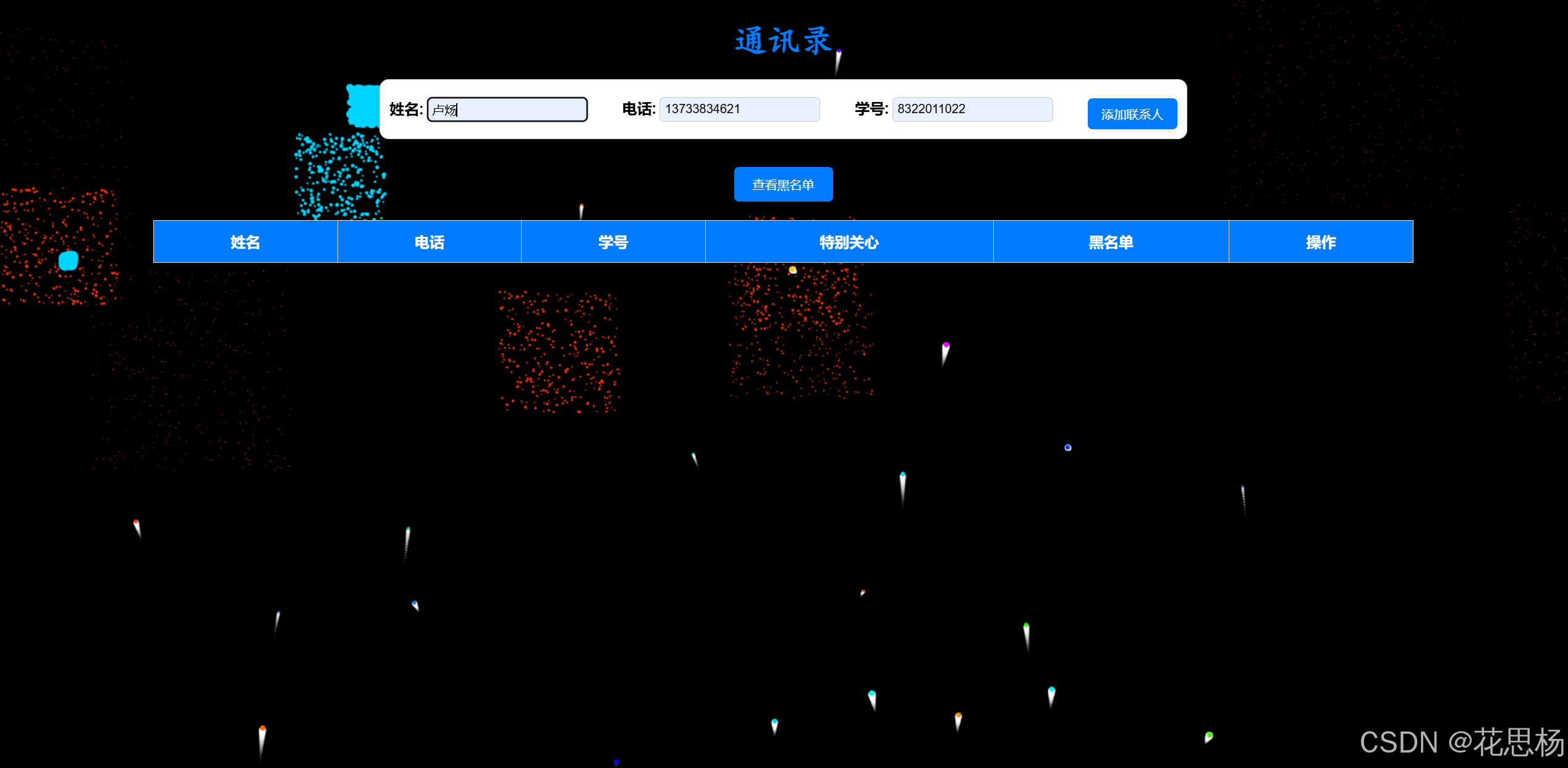
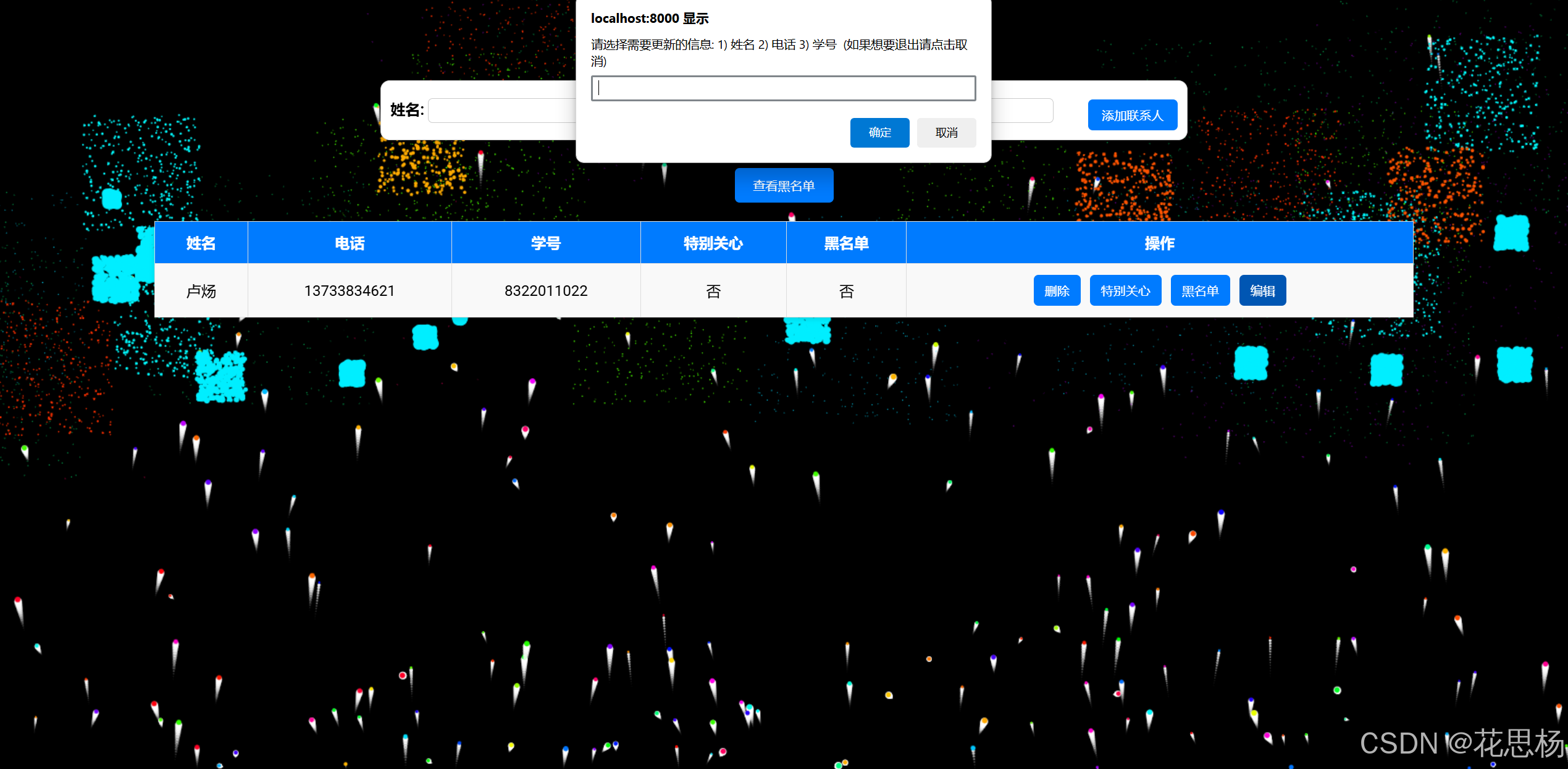
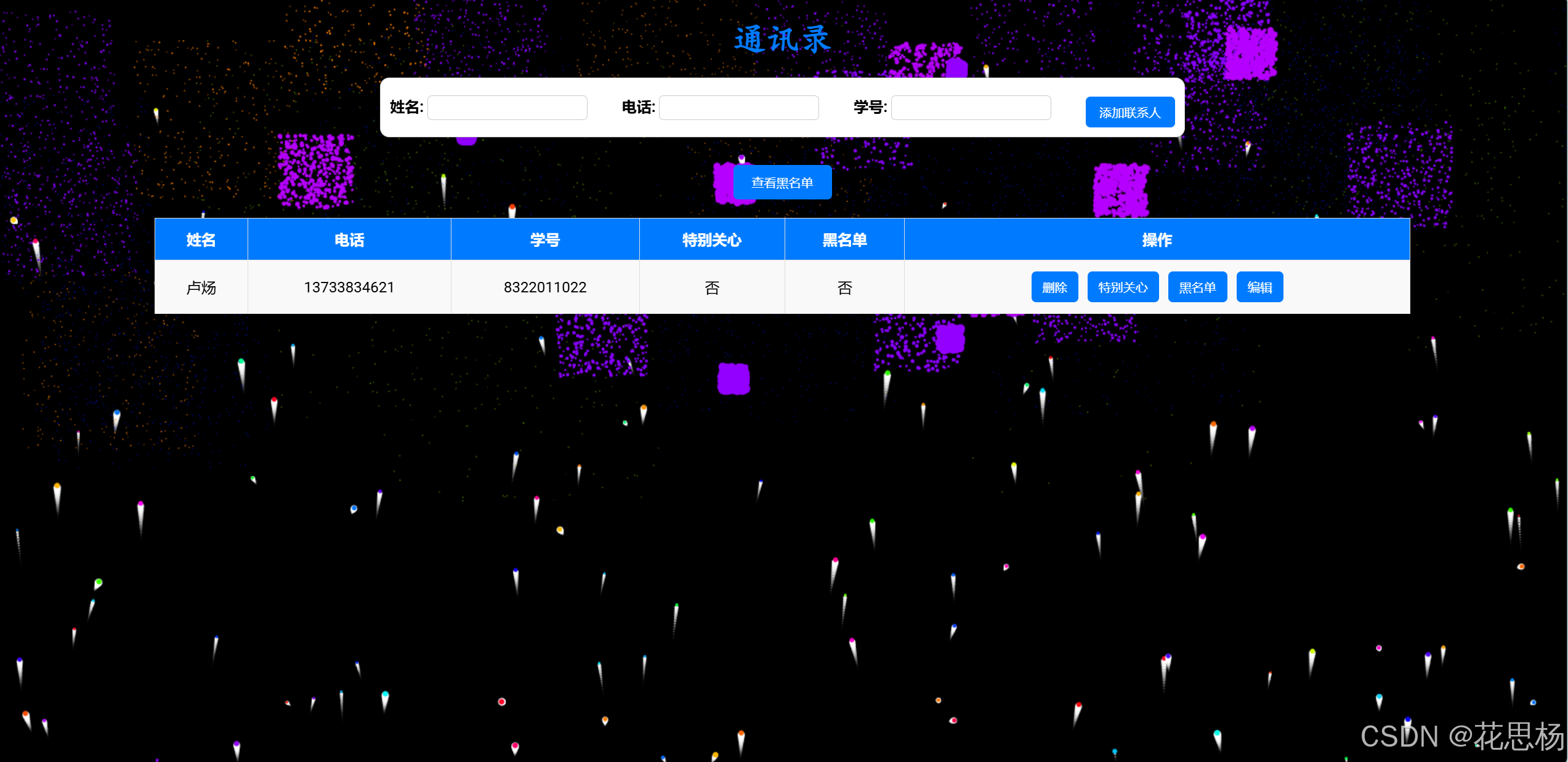
The contact management system project to achieve a number of functions. Users can add contacts, enter information such as name, phone number, and student ID, and store this data in a back-end database. The system supports the function of deleting contacts. Users can delete the specified contacts from the address book by clicking the delete button. In addition, users can modify contact information such as name, phone number, or student number by selecting the fields to be updated. The system also implements special care and blacklist functions, where users can mark a contact as special care and place it at the top, or add a contact to the blacklist and delete it from the main address book. A blacklisted contact can be deleted at any time and reappear in the address book. In addition, the dynamic fireworks effect of the front-end page is realized. The front-end is responsible for interface display and operation, and the back-end uses Flask and SQLite for data management to ensure real-time update and management of contact information.
Full Demo video
Github links about the front-end
Github links about the back-end
| Personal Software Process Stages | Estimated Time(minutes) | Actual Time(minutes) |
|---|---|---|
| Planning | 30 | 30 |
| • Estimate | 30 | 30 |
| Development | 560 | 640 |
| •Analysis | 30 | 35 |
| •Design Spec | 50 | 70 |
| •Design Review | 80 | 85 |
| •Coding Standard | 90 | 100 |
| • Design | 100 | 110 |
| •Coding | 120 | 120 |
| •Code Review | 60 | 80 |
| •Test | 30 | 40 |
| Reporting | 50 | 70 |
| •Test Repor | 20 | 20 |
| •Size Measurement | 10 | 20 |
| • Postmortem & Process Improvement Plan | 20 | 30 |
| Sum | 640 | 740 |
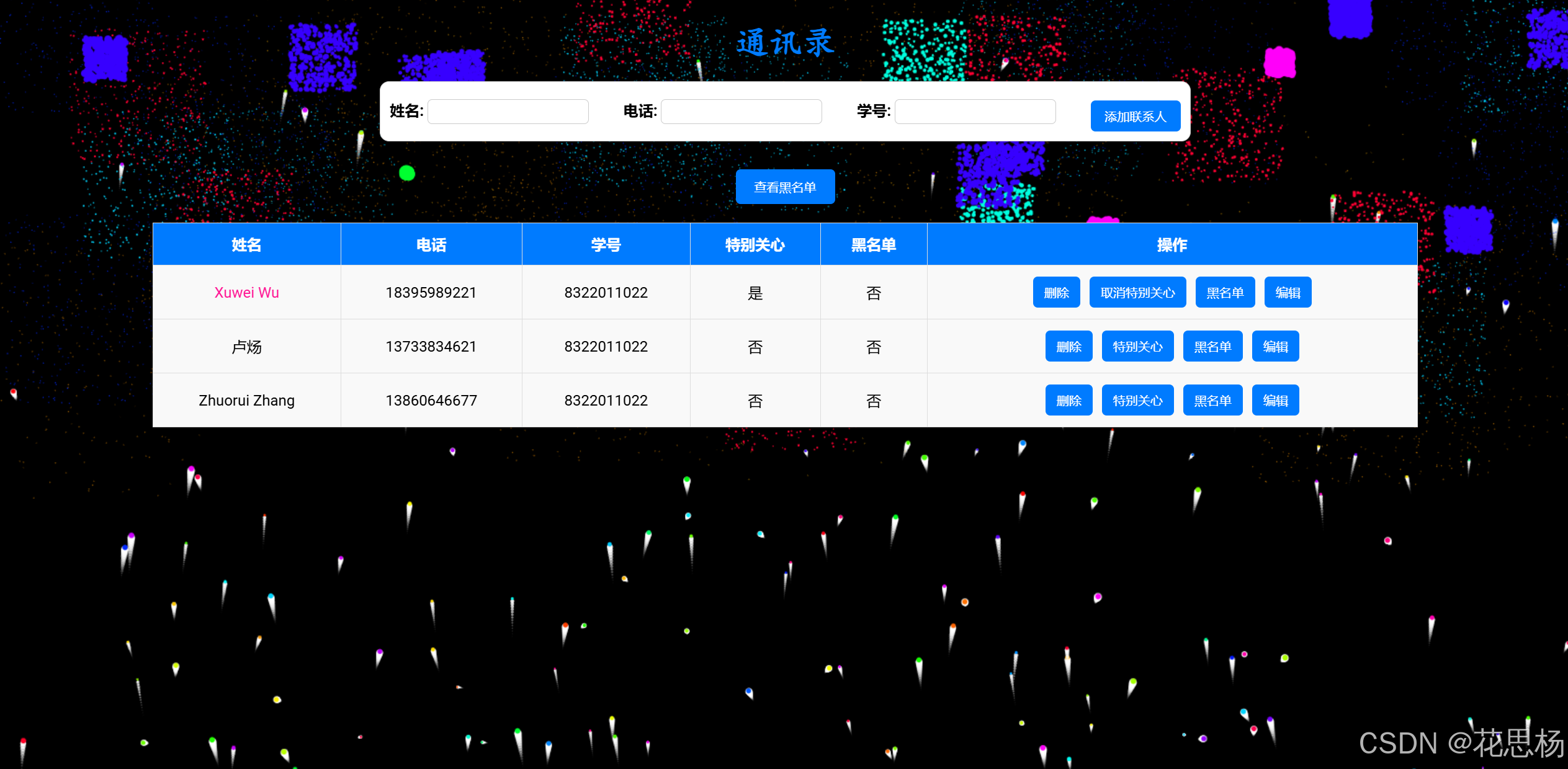
I added the Special Care function, users can automatically add the user they want to follow to the special care, add to the special care contact, the name will be pink and its information will be at the top.
I added the blacklist function, if the user is added to the blacklist, then the user's information will not appear in the contact, you can check in the blacklist, in addition, the user can also remove the blacklist contact
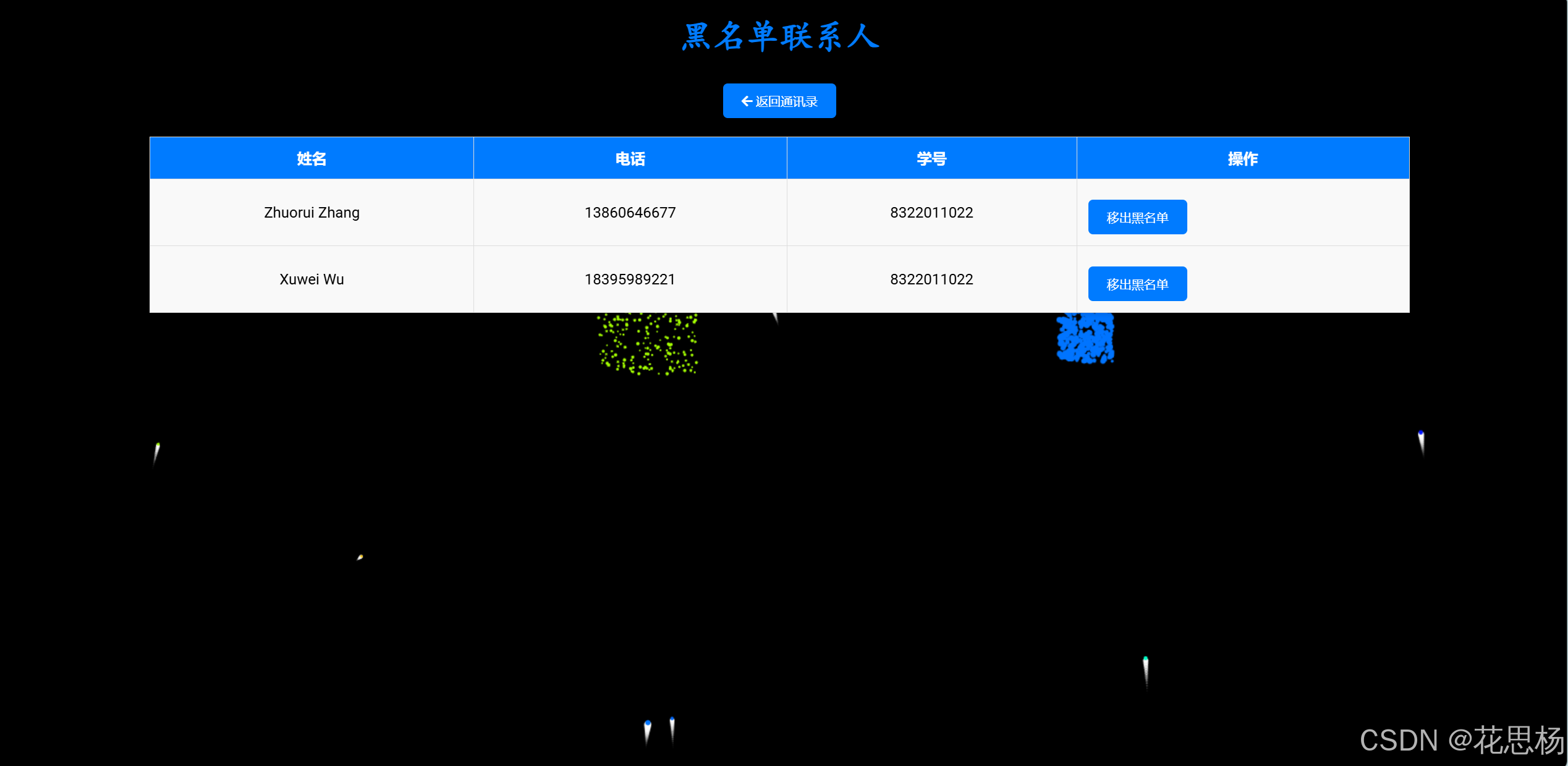
In the HTML part of the project, I mainly focused on building the structure and content layout of the address book system. HTML is responsible for defining the forms, tables, and buttons on the page. During development, I first created the basic address book interface, including:
The CSS section is responsible for the layout and interaction of the address book. I defined global page styles to keep the interface concise and responsive to user actions.
JavaScript is a core part of the front-end interaction. It is responsible for interacting with the backend API and dynamically updating the page content to ensure real-time and responsive page operations.
In the main file, the Flask framework is the core of the back-end service, handling the front-end requests, interacting with the database, and returning JSON data. Through RESTful API, I realized the function of adding, deleting, changing and checking contact data, as well as the management of special care and blacklist.
Development steps:
Project initialization: I first initialized the project with Flask
and SQLAlchemy, configured the SQLite database, and used Flask-CORs
to support cross-origin requests, ensuring a separate implementation
of the frontend and backend.
Defining the Contact model: The Contact model is defined using
SQLAlchemy. Each contact has the following fields:
id: A unique identifier for the contact name: The name of the
contact phone: The contact's phone number student_id: The student's
number special_care: A Boolean value that identifies a particularly
concerned contact blacklist: A Boolean value used to indicate if you are on a blacklist
API route design:
Get the contacts list (/contacts) :
This route returns all the contacts that are not blacklisted and places the ones of special interest at the top.
Add contact (/add_contact) :
Handles the POST request, receives the contact data from the frontend, and saves it to the database.
DELETE contact (/delete_contact/) :
This handles a DELETE request and deletes the specified contact based on its ID.
Update contact (/update_contact/) :
Handles a PUT request and allows updating any field of the contact, such as name, phone number, or student number.
Toggle Special Care state (/toggle_special_care/) :
This route handles whether the contact is special care state toggle.
Toggle blacklist state(/toggle_blacklist/) : Toggle whether the contact is in blacklist or not.
Blacklist contacts (/blacklist_contacts) : This returns all contacts in the blacklist.
Response processing: The backend API returns the corresponding JSON
message or data structure after each successful operation. After
each API operation is completed, it will ensure that the data in the
database is updated in time to ensure the consistency of the data
between the front and back ends.
Debugging and error handling: During development, I enabled Flask's
debug mode (debug=True) so that problems could be quickly identified
and resolved. At the same time, get_or_404 is used to ensure that
each operation successfully finds the target contact and handles
error requests.
Database (SQLite)
In address book system, data storage is realized by SQLite. SQLite is a lightweight embedded database, suitable for project development and small applications. Use DB Browser for SQLite to browse the contents of an SQLite database.
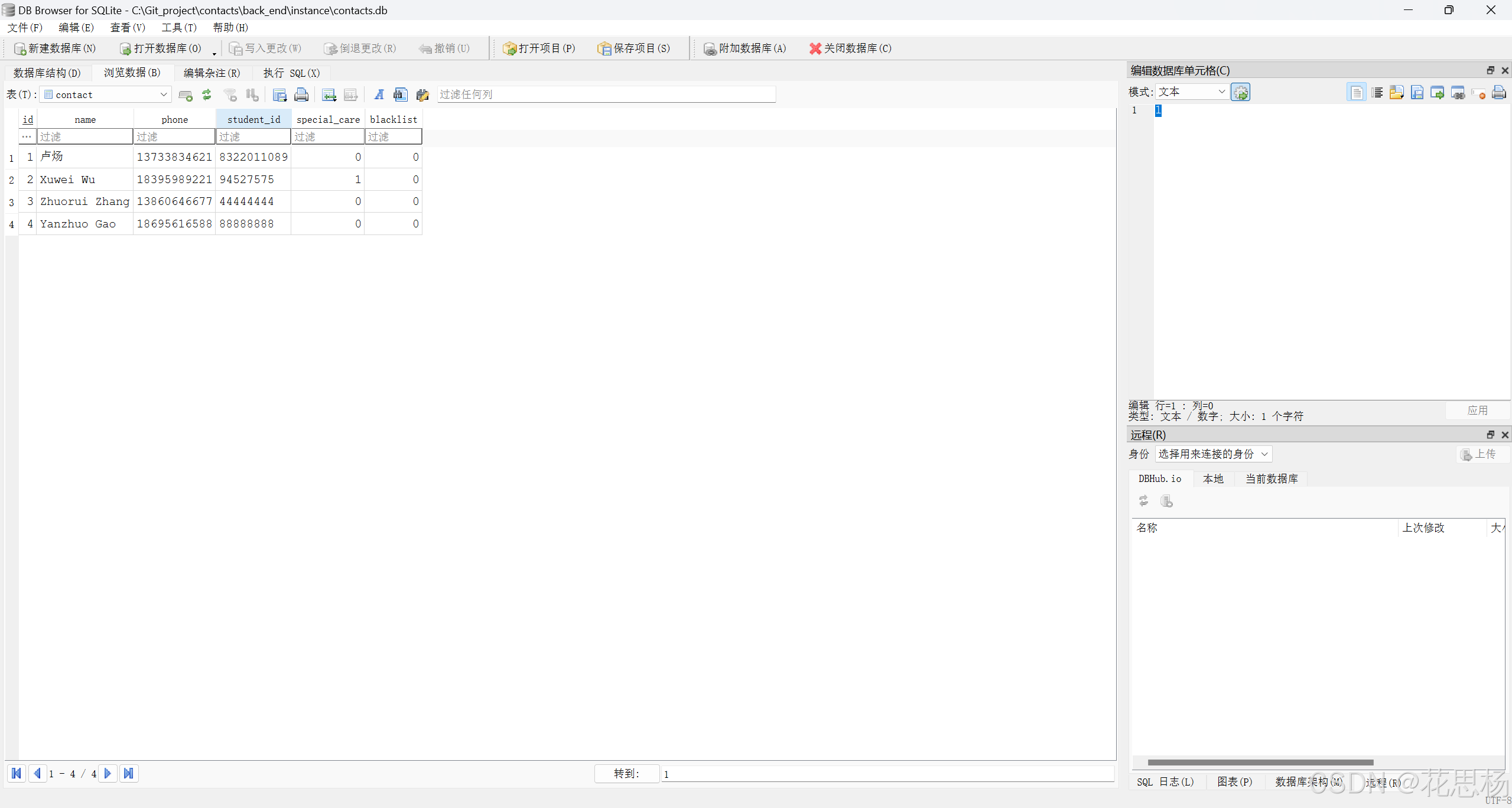
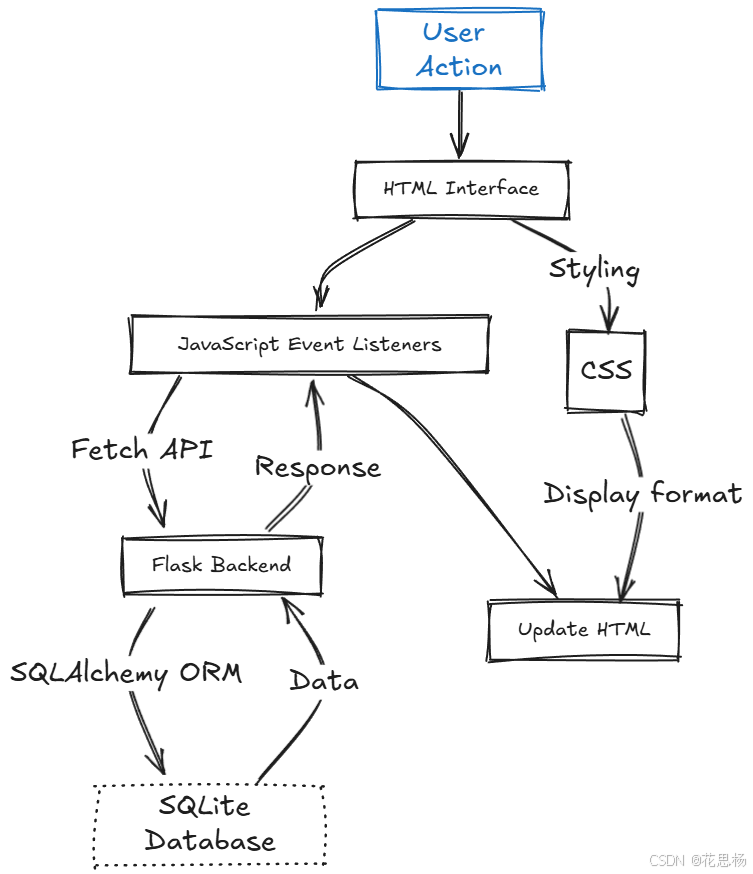
In this part, I explain the key feature code in the front-end and back-end code.
<!DOCTYPE html>
<html lang="zh">
<head>
    <meta charset="UTF-8">
    <meta name="viewport" content="width=device-width, initial-scale=1.0">
    <title>通讯录</title>
    <!-- 引入 Google Fonts 的 Lobster 字体 -->
    <link href="https://fonts.googleapis.com/css2?family=Lobster&display=swap" rel="stylesheet">
    <link rel="stylesheet" href="static/css/styles.css">
</head>

<body>
    <!-- 添加烟花动画的 canvas -->
    <canvas id="fireworksCanvas"></canvas>
    <h1>通讯录</h1>

    <!-- 添加联系人表单 -->
    <form id="add-contact-form" class="contact-form">
        <div class="form-group">
            <label for="name">姓名:</label>
            <input type="text" id="name" name="name" required>
        </div>
        <div class="form-group">
            <label for="phone">电话:</label>
            <input type="text" id="phone" name="phone" required>
        </div>
        <div class="form-group">
            <label for="student_id">学号:</label>
            <input type="text" id="student_id" name="student_id" required>
        </div>
        <button type="submit">添加联系人</button>
    </form>

    <!-- 黑名单按钮 -->
    <button onclick="viewBlacklist()">查看黑名单</button>

    <!-- 通讯录表格 -->
    <table>
        <thead>
            <tr>
                <th>姓名</th>
                <th>电话</th>
                <th>学号</th>
                <th>特别关心</th>
                <th>黑名单</th>
                <th>操作</th>
            </tr>
        </thead>
        <tbody id="contact-list">
            <!-- 联系人列表将由 JavaScript 动态填充 -->
        </tbody>
    </table>

    <script src="static/js/scripts.js"></script>
    <script src="static/js/fireworks.js"></script> <!-- 引入烟花效果的脚本 -->
</body>
</html>
<!DOCTYPE html>
<html lang="zh">
<head>
    <meta charset="UTF-8">
    <meta name="viewport" content="width=device-width, initial-scale=1.0">
    <title>黑名单联系人</title>
    <!-- 引入 Google Fonts 和 FontAwesome 图标库 -->
    <link href="https://fonts.googleapis.com/css2?family=Roboto:wght@400;700&display=swap" rel="stylesheet">
    <link rel="stylesheet" href="https://cdnjs.cloudflare.com/ajax/libs/font-awesome/5.15.4/css/all.min.css">
    <link rel="stylesheet" href="static/css/styles.css"> <!-- 引用外部CSS -->
</head>
<body>
    <!-- 添加烟花动画的 canvas -->
    <canvas id="fireworksCanvas"></canvas>
    <h1>黑名单联系人</h1>

    <!-- 返回按钮 -->
    <button onclick="window.location.href='index.html'"><i class="fas fa-arrow-left"></i> 返回通讯录</button>

    <!-- 黑名单表格 -->
    <table>
        <thead>
            <tr>
                <th>姓名</th>
                <th>电话</th>
                <th>学号</th>
                <th>操作</th>
            </tr>
        </thead>
        <tbody id="blacklist-list">

            <!-- 黑名单联系人列表将由 JavaScript 动态填充 -->
        </tbody>
    </table>
    <script src="static/js/fireworks.js"></script> <!-- 引入烟花效果的脚本 -->
    <script src="static/js/scripts.js"></script> <!-- 引用外部JS -->
</body>
</html>
form: A form for entering contact information (name, phone number, student number) and submitting it.
table: A table is used to display a list of contacts Each contact has "name", "telephone", "student number", "special concern", "blacklist", "Operation" columns.
button: Click the button to view the blacklist page.
script: This references the scripts.js file that contains the front-end interaction logic
/* 设置 canvas 全屏显示以展示烟花效果 */
#fireworksCanvas {
    position: fixed;
    top: 0;
    left: 0;
    width: 100vw;
    height: 100vh;
    pointer-events: none; /* 禁止与 canvas 进行交互 */
    z-index: -1; /* 将 canvas 放在背景 */
}

/* 使用引入的 Lobster 艺术字体 */
body {
    display: flex;
    flex-direction: column;
    align-items: center;
    background-color: #000; /* 设置黑色背景 */
    margin: 0;
    font-family: 'Roboto', sans-serif;
    min-height: 100vh;
}


h1 {
    margin-bottom: 20px;
    color: #007BFF;
    text-shadow: 2px 2px 5px rgba(0, 0, 0, 0.1);
    font-family: 'Lobster', cursive; /* 使用艺术字体 */
    font-size: 36px;
}

/* 添加联系人表单的调整 */
form {
    display: flex;
    justify-content: space-between;
    align-items: center;
    width: 50%;
    padding: 10px;
    background-color: #ffffff;
    border: 1px solid #ccc;
    border-radius: 10px;
    box-shadow: 0 2px 5px rgba(0, 0, 0, 0.1);
    margin-bottom: 20px;
}

form label {
    margin-right:10 px; /* 调整标签和输入框间距 */
    font-weight: bold;
}

form input {
    margin-right: 10px;
    padding: 5px;
    border-radius: 5px;
    border: 1px solid #ccc;
}

form button {
    padding: 8px 15px;
    border-radius: 5px;
    background-color: #007BFF;
    color: white;
    border: none;
    cursor: pointer;
    transition: background-color 0.3s ease;
}

form button:hover {
    background: #0056b3;
}

/* 表格样式调整 */
table {
    width: 80%;
    border-collapse: collapse;
    margin: 20px 0;
    background-color: #fff;
    border: 1px solid #ccc;
    box-shadow: 0 2px 5px rgba(0, 0, 0, 0.1);
}

th, td {
    padding: 12px;
    text-align: center;
    border: 1px solid #ddd;
}

th {
    background-color: #007BFF;
    color: white;
}

td {
    background-color: #f9f9f9;
}

.special-care {
    color: #FF1493;  /* 将特别关心的姓名显示为更亮眼的粉色 */
}

/* 中心对齐的操作按钮 */
.action-buttons {
    display: flex;
    justify-content: center; /* 确保按钮居中对齐 */
    align-items: center; /* 垂直居中 */
    height: 100%; /* 确保 action-buttons 高度与单元格一致 */
}
.action-buttons button {
    margin: 0 5px;
    padding: 8px 12px;
    cursor: pointer;
    background-color: #007BFF;
    color: white;
    border: none;
    border-radius: 5px;
    transition: background 0.3s ease;
}

.action-buttons button:hover {
    background-color: #0056b3;
}

/* 针对黑名单表格的调整 */
button {
    background-color: #007BFF;
    color: white;
    border: none;
    padding: 8px 15px;
    border-radius: 5px;
    cursor: pointer;
    transition: background 0.3s ease;
}

button:hover {
    background-color: #0056b3;
}

/* 调整按钮的位置和样式 */
button {
    margin-top: 10px;
    display: block;
    background-color: #007BFF;
    color: white;
    border: none;
    padding: 10px 20px;
    border-radius: 5px;
    cursor: pointer;
    transition: background 0.3s ease;
}

button:hover {
    background-color: #0056b3;
}

/* 将按钮所在的单元格内容居中 */
.center-button {
    text-align: center;
}

/* 让按钮在单元格中居中对齐 */
.center-button button {
    display: inline-block;
    margin: 0 auto;
    padding: 10px 15px;
    background-color: #007BFF;
    color: white;
    border: none;
    border-radius: 5px;
    cursor: pointer;
    transition: background 0.3s ease;
}

.center-button button:hover {
    background-color: #0056b3;
}
body: This defines a centered page layout with a light gray background color and Arial font.
h1: Sets the top spacing of the header.
form: This sets the style, border, padding, and background color for the add contact form.
table: This defines the style of the contact table, setting borders, spacing, shadows, and so on.
Special-care: The name of the contact with special care is shown in pink.
action-buttons: These buttons are displayed when the user hovers over the contact's row (via :hover)
document.addEventListener('DOMContentLoaded', function() {
    if (window.location.pathname.includes('blacklist.html')) {
        loadBlacklist();  // 如果是黑名单页面,加载黑名单联系人
    } else {
        loadContacts();  // 如果是主页面,加载所有联系人
    }

    const addContactForm = document.getElementById('add-contact-form');
    if (addContactForm) {
        addContactForm.addEventListener('submit', function(event) {
            event.preventDefault();
            addContact();
        });
    }
});
When the page loads, the current page path is checked. Call loadBlacklist() if the page is blacklisted, and loadContacts() otherwise.
Listen for the submit event of the add contact form and call addContact() to send the data to the backend.
function loadContacts() {
    fetch(`${BASE_URL}/contacts`)
        .then(response => response.json())
        .then(data => {
            const contactList = document.getElementById('contact-list');
            contactList.innerHTML = '';
            data.forEach(contact => {
                const row = document.createElement('tr');
                row.className = 'contact';
                row.innerHTML = `
                    <td class="${contact.special_care ? 'special-care' : ''}">${contact.name}</td>
                    <td>${contact.phone}</td>
                    <td>${contact.student_id}</td>
                    <td>${contact.special_care ? '是' : '否'}</td>
                    <td>${contact.blacklist ? '是' : '否'}</td>
                    <td>
                        <div class="action-buttons">
                            <button onclick="deleteContact(${contact.id})">删除</button>
                            <button onclick="toggleSpecialCare(${contact.id})">${contact.special_care ? '取消特别关心' : '特别关心'}</button>
                            <button onclick="toggleBlacklist(${contact.id})">${contact.blacklist ? '移出黑名单' : '黑名单'}</button>
                            <button onclick="editContact(${contact.id})">编辑</button>
                        </div>
                    </td>
                `;
                contactList.appendChild(row);
            });
        })
        .catch(error => console.error('Error fetching contacts:', error));
}
Get the contact data by calling the /contacts API and display it in a table on the front end.
Each contact has delete, Special Care, blacklist, edit buttons.
function editContact(id) {
    const field = prompt("请选择需要更新的信息: 1) 姓名 2) 电话 3) 学号");
    if (!field) return;

    let newValue;
    switch (field) {
        case '1':
            newValue = prompt("输入新的姓名:");
            if (newValue) {
                updateContactField(id, { name: newValue });
            }
            break;
        case '2':
            newValue = prompt("输入新的电话:");
            if (newValue) {
                updateContactField(id, { phone: newValue });
            }
            break;
        case '3':
            newValue = prompt("输入新的学号:");
            if (newValue) {
                updateContactField(id, { student_id: newValue });
            }
            break;
        default:
            alert("无效的选择,请选择 1、2 或 3");
            break;
    }
}
The user is prompted to select the field that needs to be updated (name, phone, or student number), and then the updateContactField function is called based on what the user enters.
function toggleSpecialCare(id) {
    fetch(`${BASE_URL}/toggle_special_care/${id}`, {
        method: 'POST'
    })
    .then(response => {
        if (response.ok) {
            loadContacts();  // 成功后重新获取联系人列表
        } else {
            console.error('Failed to toggle special care');
        }
    })
    .catch(error => console.error('Error toggling special care:', error));
}
When the user clicks the "Particularly cared" button, we call this function to send a request to the backend to toggle the particularly cared state for a particular contact.
from flask import Flask, request, jsonify
from flask_sqlalchemy import SQLAlchemy
from flask_cors import CORS

app = Flask(__name__)
CORS(app)  # 启用跨域资源共享

app.config['SQLALCHEMY_DATABASE_URI'] = 'sqlite:///contacts.db'
app.config['SQLALCHEMY_TRACK_MODIFICATIONS'] = False
db = SQLAlchemy(app)
Flask is used to build backend applications.
CORS allows the frontend to communicate with the backend across domains.
The SQLite database path is configured and SQLAlchemy is used for database management.
class Contact(db.Model):
    id = db.Column(db.Integer, primary_key=True)
    name = db.Column(db.String(50), nullable=False)
    phone = db.Column(db.String(20), nullable=False)
    student_id = db.Column(db.String(20), nullable=False)
    special_care = db.Column(db.Boolean, default=False)
    blacklist = db.Column(db.Boolean, default=False)
The Contact model defines the structure of the contact table, including name, phone number, student number, special interest status, and blacklist status.
Each field is defined using SQLAlchemy's db.Column.
@app.route('/contacts', methods=['GET'])
def get_contacts():
    contacts = Contact.query.filter_by(blacklist=False).all()
    contacts_sorted = sorted(contacts, key=lambda x: x.special_care, reverse=True)
    contacts_list = [{
        'id': contact.id,
        'name': contact.name,
        'phone': contact.phone,
        'student_id': contact.student_id,
        'special_care': contact.special_care,
        'blacklist': contact.blacklist
    } for contact in contacts_sorted]
    return jsonify(contacts_list)
This API takes all the contacts that are not blacklisted and sorts them by whether they are of special interest or not.
A JSON response is returned, and the frontend uses this API to fetch and display the contact.
@app.route('/add_contact', methods=['POST'])
def add_contact():
    data = request.json
    new_contact = Contact(
        name=data['name'],
        phone=data['phone'],
        student_id=data['student_id']
    )
    db.session.add(new_contact)
    db.session.commit()
    return jsonify({"message": "Contact added successfully!"}), 201
The front-end sends the contact information (name, phone number, student number) and the back-end receives it and stores it into the database.
Insert the database using db.session.add and db.session.mit ().
@app.route('/delete_contact/<int:id>', methods=['DELETE'])
def delete_contact(id):
    contact = Contact.query.get_or_404(id)
    db.session.delete(contact)
    db.session.commit()
    return jsonify({"message": "Contact deleted successfully!"}), 200
Delete a specific contact from the database based on the contact id.
Delete with db.session.delete and db.session.mit ().
@app.route('/toggle_special_care/<int:id>', methods=['POST'])
def toggle_special_care(id):
    contact = Contact.query.get_or_404(id)
    contact.special_care = not contact.special_care
    db.session.commit()
    return jsonify({"message": f"Contact special care status toggled to {contact.special_care}"}), 200
The API toggles whether a particular contact is particularly concerned or not based on its id.
@app.route('/update_contact/<int:id>', methods=['PUT'])
def update_contact(id):
    data = request.json
    contact = Contact.query.get_or_404(id)

    contact.name = data.get('name', contact.name)
    contact.phone = data.get('phone', contact.phone)
    contact.student_id = data.get('student_id', contact.student_id)

    db.session.commit()
    return jsonify({"message": "Contact updated successfully!"}), 200
The front end provides new contact data, and the back end updates the existing contact information in the database based on this data.
class Firework {
    constructor() {
        this.x = Math.random() * canvas.width;
        this.y = canvas.height;
        this.targetY = Math.random() * (canvas.height / 2);
        this.size = Math.random() * 2 + 1;
        this.color = `hsl(${Math.random() * 360}, 100%, 50%)`;
        this.speedY = Math.random() * 1.5;
        this.speedX = Math.random() * 1 - 0.5;
        this.tail = [];
    }
        update() {
        this.tail.push({ x: this.x, y: this.y });
        if (this.tail.length > 15) this.tail.shift();

        this.x += this.speedX;
        this.y -= this.speedY;

        if (this.y <= this.targetY) {
            this.explode();
            this.reset();
        }
    }

    draw() {
        for (let i = 0; i < this.tail.length; i++) {
            let pos = this.tail[i];
            let alpha = i / this.tail.length;
            ctx.beginPath();
            ctx.arc(pos.x, pos.y, this.size * (i / 10), 0, Math.PI * 2);
            ctx.fillStyle = `rgba(255, 255, 255, ${alpha})`;
            ctx.fill();
        }

        ctx.beginPath();
        ctx.arc(this.x, this.y, this.size, 0, Math.PI * 2);
        ctx.fillStyle = this.color;
        ctx.fill();
    }
Firework class: This class defines the behavior and properties of a firework ascent
x, y: The starting position of the fireworks, x is horizontally random, while y always starts from the bottom of the canvas.
targetY: The target height of the fireworks, randomly decided to stay somewhere in the top half of the canvas and explode.
size and color: The size and color of each firework are randomly generated, using the HSL color model to generate colors.
speedY and speedX: Vertical and horizontal rise speed, the horizontal speed simulates the effect of fireworks rising slightly curved.
tail: Used to store the wake of the firework as it rises.
update() method: update the position of the fireworks and record the position of the wake. After each movement, the length of the wake is controlled within 15 points.
Change of x and y: speedX and speedY are used to update the horizontal and vertical positions of the fireworks to simulate the movement of the fireworks rising. When the targetY is reached, the explode() method is called to generate the explosive particles, and reset() is called to reset the state of the fireworks.
The draw() method: draws the current state of the fireworks, including the fireworks ontology and the wake.
The wake of the firework is drawn from the position recorded in the tail array, and the opacity of the wake changes over time to simulate the fading effect.
During the development of this contact management project, I embarked on a personal journey that deepened my understanding of both front-end and back-end technologies. Working with HTML, CSS, and JavaScript allowed me to enhance the user interface and ensure smooth user interactions, while the back-end development using Flask and SQLAlchemy sharpened my skills in database management and API integration. I faced several challenges, such as handling cross-origin requests, ensuring dynamic updates without page reloads, and managing state across front-end and back-end seamlessly. Through this process, I gained valuable experience in building full-stack applications, improved my problem-solving skills, and learned how to create efficient, user-friendly systems from the ground up.

